
BigQuery stored procedures are incredibly useful. Google defines them as being “a collection of statements that can be called from other queries or other stored procedures. A procedure can take input arguments and return values as output.”
Lovely! So we can declare some variables and then feed them as input arguments to our stored procedure when it runs, for example:
More complex scenarios
BUT what do we do when there are, for example, multiple companies? And perhaps each company’s data is stored in a different table? And perhaps each company has some unique WHERE clauses? And the outputs need to be written to different tables? Essentially the code to process the data can be run through one stored procedure, but we need the flexibility to deal with complex scenarios while avoiding lots of boilerplate code or hard-coding.
Scripting allows us to create a single stored procedure which can be used to update data for multiple companies / tables, etc. Rather than, e.g. creating 4 stored procedures or scheduled queries to update 4 different tables, we create a single stored procedure and use variables to insert the correct source and destination tables and any other specifics like where clauses at runtime.
This process cuts down on boilerplate code, and makes it very simple to add additional companies or other types of variable without having to create new scripts.
The following is just one way to realize this dream and does take a little extra up-front thought and effort, but once in place it’s incredibly simple to setup, define, troubleshoot and change – and even reduces the chances of errors occurring when updates are required.
Scripting overview
There are only 2 main components to setup this scripting methodology:
- The scripting config table – this will hold all variables required to run each variant of your stored procedure
- The stored procedure itself – which reads in and uses the variables stored in the scripting config table
Scripting config table
This table can be stored anywhere, but it would be advisable to keep it in a dataset of its own to prevent accidental deletion! You also need to make sure that you can retrieve past values, just in case of accidental changes (it’s so easy to run TRUNCATE TABLE in BigQuery and no questions are asked 🤣).
Key fields in the table include:
- record_uuid – unique identifier for each record in the table
- process_name – descriptive name for the process driven by the record, e.g. ‘update_customer_scores’. This will be used to select which process should be referenced when the stored procedure runs.
- company – or other primary identifier, depending on your use case. This will be used to make sure the right source tables, target tables and where clauses are inserted at run time for each company.
- source_tables – a
JSONfield where you can specify multiple source tables required by the stored procedure - source_where_clauses – a
JSONfield where you can specify multiple WHERE clauses or other types of variables required by the stored procedure - target_tables – a
JSONfield where you can specify multiple target tables required by the stored procedure
Below is an example of how this table might be populated
In the above scenario the first JSON entry refers to source_tables where Scores is how we will refer to the table containing the relevant company scores and ScoreAttributions is how we will refer to the table containing the relevant attributions. Notice how the values for each of these aliases differs between Company A and Company B. The second JSON entry refers to the custom values required for the various source_where_clauses for each company. Notice that the entries for Target in the third JSON entry which refers to target_tables are the same for both companies: this is because both sets of results will be inserted into a single table.
Stored procedure usage
The essential outline of what we will do in this step is create a stored procedure which will:
- Read the variables per paywall the we setup in the scripting config table
- Compile a query per company with the appropriate variables
- Insert each query into an array of queries
- Loop through each entry in the scripting config table to assemble the query and execute it
Below is a skeleton outline for creating a script with each part’s contribution explained inline for clarity. This can be used as a template to create your own stored procedures. Highlights to note include:
- You may use a combination of stored procedured input parameters and config table input parameters as required
- DECLARE a variable of type STRING for each query to be executed
- DECLARE a variable of type ARRAY<STRING> which will handle the execution (one query to be executed per line in the config table)
- Note
EXECUTE IMMEDIATEstatements are what actually run the code - These can be commented out for testing purposes if required
- It should also be noted that each EXECUTE IMMEDIATE statement can only run one DDL or DML so you’ll need to declare a variable for each delete, insert, merge, etc. that you intend to run – they cannot be run altogether in one statement
- The text of the query to be run should be enclosed in triple quotes (
"""...""") - Variable names to be referenced in the query should be enclosed in triple quotes and double pipes (
"""||...||""") - Add additional punctuation around the variable names as required, e.g. in this example backticks are added for the table name:
DELETE FROM `"""||Target||"""` - Use
JSON_EXTRACT_SCALARto extract individual values from the relevantJSONcolumn in the config table, and the format ‘$.VariableName’ to specify which value you want to specifically extract - Filter by
process_nameandcompanyfrom your config table so you only get the values required for this particular stored procedure - The actual execution is run in a for loop which can be sequenced if that is important, e.g. if Company A should run before Company B
- Gotcha 👾👾👾… Any REGEX inside the script will need to be formed with extra escape characters so, e.g.
REGEXP_EXTRACT(LOWER(Url),r'([a-z\-0-9]*\-[0-9]{8}(?:\-[0-9]*)?)(?:[?].*?)?$')will be expressed asREGEXP_EXTRACT(LOWER(Url),r'([a-z\\-0-9]*\\-[0-9]{8}(?:\\-[0-9]*)?)(?:[?].*?)?$')in the script. However when the final code is assembled this resolves to its ‘normal’ format.
Testing & troubleshooting
To do a test run, to generate each script with its associated variables, comment out all your EXECUTE IMMEDIATE statements, and then call your stored procedure. The results will look similar to this:
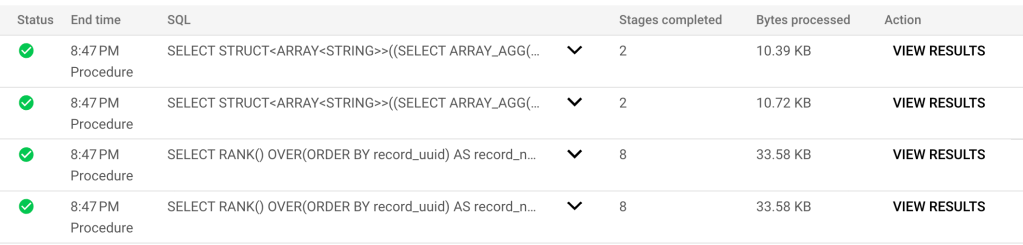
The first 2 items above SELECT STRUCT, etc. will contain the code to be executed for each record, click on VIEW RESULTS and you will see the query text generated for each script.
To validate whether your script would have run successfully, copy the query text into a new BigQuery window and troubleshoot any errors as usual, updating your script as you go.
The second 2 items above SELECT RANK() etc. will show you what all of your variables look like that were inserted. This can also be useful as a quick check that errors have not been introduced into the config table.
Productionizing & updating
Once you are happy that your scripts will run, remember to put back your EXECUTE IMMEDIATE statements! Typically you could now use a scheduled query to get your stored procedure to run daily. Don’t forget that multiple stored procedures can be included into a single scheduled query, for example:
The first item is the imaginary scenario that we worked where Company A and Company B were required. If we receive a request to add Company C we simply update the config table and our work is done! For example:
Happy scripting 😃
 Sho't left to data science